Accessibility, AI and Automation: Designing Systems That Adapt to People
One area often overlooked in discussions about AI and accessibility is that accessibility is not solely about disability.
It is also about recognising that people access, absorb, process, communicate and act on information differently.
Some people prefer visual information. Others prefer written instructions.
Some need information broken into smaller steps. Others work best when they understand the overall objective before tackling individual tasks.
Those differences exist in every workplace.
They can arise because of disability, neurodivergence, health conditions, language, circumstances, communication preferences or simply differences between people.
The question is therefore bigger than how technology can provide adjustments for particular groups.
It is whether we continue building systems around an assumed “standard” user and then adapt them for everybody else, or start designing technology around the reality that human beings are different.
Accessibility Is Not Just About Disability
We Cannot Build Tomorrow’s Technology Around Yesterday’s Assumptions
One of the greatest opportunities presented by AI and automation is not simply to make existing processes faster.
It is the opportunity to question whether those processes were designed well in the first place.
Many traditional workplace systems have been built around assumptions about how people should receive information, communicate, interact with technology, and complete work.
People who do not fit comfortably within those conventions are often expected to request adjustments or find alternative ways of navigating them.
Technology has advanced enormously, but that underlying principle has not always advanced with it.
If we take an inaccessible or poorly designed process and simply automate it, we risk creating a faster version of a system that already excludes people.
We risk using tomorrow’s technology to reproduce yesterday’s barriers.
That would be a significant missed opportunity.
AI and digital technology can support different ways of interacting with information, including text, speech, captions, summaries, structured instructions and assistive technologies. But AI can also introduce new accessibility barriers, bias and loss of user agency if inclusion is not considered during design. Microsoft’s guidance on accessibility and inclusion for AI agents specifically recommends building accessibility and inclusion into AI design while respecting privacy and consent.
Microsoft- View their stance on accessibility and integrating their policies in development of their technology:
Microsoft Accessibility | Microsoft Trust Center
Inside Track - Mapping the Microsoft approach to accessibility in the world of AI
People are not an add-on to technology.
Accessibility therefore should not sit at the edge of technological development as a feature added for a minority after the “main” system has been built.
It should be considered alongside security, privacy, governance, and usability from the beginning.
Systems Should Adapt to People
Traditional workplace processes often follow a simple model:
Everyone receives the same information in the same way.
But equal delivery does not necessarily produce equal access.
One person may need a detailed explanation. Another may need a concise list of actions.
One may rely on a screen reader. Another may benefit from captions or transcripts.
Someone may use voice input rather than a keyboard.
Someone else may need additional processing time, reminders, reduced jargon or a predictable structure.
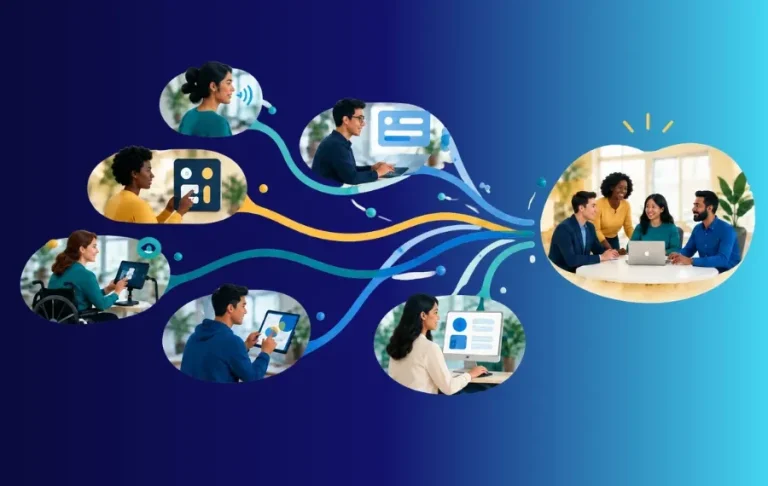
The objective does not necessarily need to change.
The route to achieving it can.
Modern digital systems give organisations an opportunity to move away from unnecessarily rigid, one-size-fits-all processes and provide multiple accessible routes towards the same business outcome.
What Could This Look Like in Practice?
Accessibility requirements can differ considerably between individuals, including people with the same disability or condition. Adjustments should therefore be based on the individual rather than assumptions about a diagnosis. This is also consistent with Acas guidance on reasonable adjustments, which stresses that adjustments are specific to the individual and employers should talk with the person rather than make assumptions.
Read up on Acas outline & information on reasonable adjustments
What reasonable adjustments are - Reasonable adjustments at work - Acas
But there are practical examples of how better system design can remove common barriers.
Visual Impairment and Low Vision
A visually impaired employee can encounter barriers when a system relies on small text, colour alone, poorly labelled controls, inaccessible documents or images containing important information unavailable as text.
Better design can include:
•Screen-reader compatible content
•Meaningful headings and document structures
•Appropriate alternative text
•Sufficient colour contrast
•Keyboard-accessible navigation
•Accessible documents rather than image-only files
•Read-aloud functionality
•Notifications that do not communicate status through colour alone
The business objective has not changed.
The barrier to accessing it has been reduced.
Deafness and Hearing Loss
A deaf or hard-of-hearing employee may face a different set of barriers if important information is communicated primarily through telephone calls, meetings or video.
Technology can support alternatives such as:
•Live captions
•Transcripts
•Written meeting summaries
•Captioned training materials
•Visual notifications
•Written confirmation of actions and decisions
These capabilities can benefit other people too, including remote workers, people working in noisy environments and colleagues wanting to review what was agreed after a meeting.
Microsoft’s accessibility scenarios for Microsoft 365 Copilot include hearing loss alongside blindness, mobility disability, ADHD, dyslexia, autism and other situations, demonstrating how different accessibility needs can influence the way technology is used.
Physical and Motor Disabilities
Someone with limited dexterity, tremors, arthritis or another motor impairment may encounter unnecessary barriers in processes requiring repeated mouse movements, small controls, excessive typing or repetitive manual data entry.
Better system design might include:
•Keyboard navigation
•Voice input
•Appropriate interactive controls
•Automatically populated information
•Fewer repetitive actions
•Automated document creation
•Simplified forms
•Reduced copying and pasting
•Fewer unnecessary manual steps
In this situation, automation does more than save time.
It can help remove a physical barrier to completing the work.
Speech and Communication Differences
A process that assumes everybody can comfortably make a telephone call, respond immediately in a meeting or communicate complex information verbally can also create barriers.
Alternative routes might include:
•Written communication
•Structured digital forms
•Chat during meetings
•Advance agendas and questions
•Asynchronous responses
•AI-assisted drafting
•Different ways to contribute ideas or feedback
The objective is not to eliminate spoken communication.
It is to avoid making one method of communication the only route to participation.
Cognitive Disabilities, Acquired Brain Injury and Memory Difficulties
Some people may experience difficulties with memory, concentration, sequencing or information processing.
Digital workflows can support this through:
•Clear sequential instructions
•Consistent terminology
•Reminders
•Checklists
•Progress indicators
•Repeatable templates
•Clear completion confirmation
•Information that can be revisited rather than relying on memory
Many of those features can also make a process easier for somebody who is new to a role, under pressure or simply unfamiliar with the task.
Chronic Illness, Pain and Fatigue
Accessibility needs are not always visible.
Someone living with chronic pain, fatigue or a fluctuating health condition may be fully capable of performing a role but find unnecessary administration and constant switching between systems particularly demanding.
Consider a process requiring someone to:
1.Receive an approval email.
2.Locate a SharePoint folder.
3.Download a document.
4.Rename it.
5.Upload it elsewhere.
6.Update a tracker.
7.Notify somebody that it has been completed.
If automation can reliably complete several of those steps, the employee can concentrate on the parts requiring their judgement.
For everybody, that may be a productivity improvement.
For somebody experiencing pain or fatigue, removing unnecessary work may also remove an accessibility barrier.
Neurodivergence
Neurodivergence is another important part of this picture, rather than the whole picture.
An autistic employee, for example, may find unnecessarily ambiguous communication difficult to interpret. Someone with ADHD may benefit from prioritised actions and reminders. Someone with dyslexia may benefit from read-aloud functionality, accessible formatting or summarisation.
Needs are individual, however, and a diagnosis should not be treated as an instruction manual for how somebody works.
This is precisely why flexible systems are important.
One Process, Different Ways of Interacting With It
Consider a simple workplace approval.
A traditional automated message might say:
Request Approved
Your request has now been processed. Please refer to the appropriate documentation and proceed accordingly.
Technically, the system has worked.
But the person still has to determine what “proceed accordingly” means.
Instead, a workflow could provide:
What has happened?
Your request has been approved.
What do you need to do next?
1.Create the project folder.
2.Upload the approved proposal.
3.Schedule the kick-off meeting.
When is it due?
Friday at 4pm.
What does complete look like?
The project folder has been created, the approved document is stored within it and the meeting invitation has been sent.
For another person, the same process might provide a shorter summary, an accessible document, read-aloud support, a transcript, appropriately structured content or another accessible method of interaction.
The underlying business process can remain consistent.
The experience does not have to be identical.
That technology already exists in various forms. Microsoft’s accessibility resources, for example, illustrate applications of Microsoft 365 Copilot across hearing loss, blindness, mobility disability and neurodivergence.
Personalised Information, Not Personalised Labels
This is where personalisation becomes particularly interesting.
A system does not always need to know somebody’s diagnosis or medical history to provide useful flexibility.
Depending on the purpose and the individual, relevant preferences might include:
•Step-by-step instructions
•A summary before the detail
•Additional context
•Reduced jargon
•Written rather than verbal information
•Accessible document formats
•Captions or transcripts
•Read-aloud compatible content
•Reminders
•Different methods of input or interaction
Instead of beginning with:
“What condition do you have?”
Organisations can often begin with a much more useful question:
“What helps you access information and work effectively?”
This approach should complement, not replace, conversations about individual reasonable adjustments where they are required.
UK employers have legal responsibilities to make reasonable adjustments where disabled workers or applicants would otherwise be substantially disadvantaged.
Privacy matters too. If organisations record accessibility or communication preferences, they need appropriate consent, security and data governance rather than collecting sensitive personal information simply because technology allows it. Microsoft’s inclusive AI guidance similarly links inclusive design with privacy and consent.

Could your systems work better for the people using them?
Explore how we help organisations improve workflows, processes and Microsoft 365 systems.
There is also an opportunity to make accessibility more proactive.
Traditionally, support can depend upon someone identifying a problem, explaining it, requesting an adjustment and waiting for changes to be implemented.
Some adjustments will always need an individual discussion.
But organisations can remove many unnecessary barriers before that stage.
Recruitment processes can be accessible. Onboarding can ask about communication and accessibility requirements. Documents can be created accessibly by default. Meetings can support captions and transcripts. Workflows can provide clear instructions and alternative routes to information.
This does not remove the need for individual reasonable adjustments.
It creates a better baseline before those adjustments are needed.
In the UK, accessible recruitment is particularly important because the duty to make reasonable adjustments can also apply to disabled job applicants, not only existing employees.
Read up on Gov.Uk Reasonable adjustments: Legal duty
Accessibility Should Start Before Someone Has to Ask
Accessibility That Survives Organisational Change
Embedding accessibility principles into systems also improves continuity.
A good process should not become inaccessible because a supportive manager leaves.
Accessible templates remain accessible.
Workflow options remain available.
Document standards remain in place.
Technology settings and agreed individual adjustments can be managed appropriately.
New employees enter an environment in which accessibility is already part of the operating model.
Accessibility becomes less dependent on one person remembering to “do accessibility” and more embedded in how the organisation operates.
Accessibility Is Also About Opportunity
This is where the argument becomes much bigger than workplace adjustments.
Accessible design can influence who has the opportunity to enter and contribute to a workplace in the first place.
Sometimes the barrier preventing someone from succeeding in a role is not actually inherent to the work.
It is something we have designed around the work.
A visually impaired candidate might possess exactly the expertise required for a role but encounter inaccessible recruitment or business software.
A deaf employee may possess the necessary professional knowledge but encounter a workplace where essential information exists only in uncaptioned conversations.
Someone with limited dexterity may be highly capable of making complex professional decisions while struggling with unnecessary repetitive data entry.
A person with a communication disability may possess considerable expertise but encounter a recruitment or operating model built around spontaneous verbal communication.
An autistic person might possess exceptional technical capability while encountering unnecessary barriers created by ambiguous instructions and unwritten workplace expectations.
So we should ask:
Is this requirement genuinely inherent to the role, or have we created it through the way the role and its surrounding systems have been designed?
That question matters commercially as well as ethically.
Accessibility Can Expand Participation, Not Just Provide Support
If technology removes unnecessary barriers, organisations potentially increase the range of people able to participate in roles, professions and sectors.
A person excluded by an inaccessible system may not require the fundamental work to change.
They may need another viable route to doing it.
AI, automation and accessible digital technology expand the possibilities:
•Speech can become text.
•Text can become speech.
•Meetings can produce captions and transcripts.
•Complex information can be summarised.
•Tasks can be structured into sequential steps.
•Routine administration can be automated.
•Information can be provided through different formats.
•Repetitive typing can be reduced.
•Different methods of interaction can lead towards the same outcome.
The objective remains consistent.
The route becomes more flexible.
This creates an opportunity for organisations to reach talent and capability that inflexible systems may currently exclude.
Microsoft’s own accessibility guidance explicitly connects accessible technology with employee productivity, inclusion, attracting talent, innovation and broader market reach.
Accessibility should therefore be understood not purely as support.
It can also be an enabler of participation, talent and growth.
Better Accessibility Can Improve Work for Everyone
There is another reason to design this way.
Many improvements associated with accessibility are simply good system design.
Clear instructions help more than one group.
Reduced jargon helps more than one group.
Well-structured documents help more than one group.
Captions help more than people with hearing loss.
Logical workflows help more than people with cognitive or processing differences.
Reduced repetitive administration helps more than people with mobility difficulties or fatigue.
Accessible design does not mean assuming that everybody needs the same adjustment.
It means creating systems with fewer unnecessary barriers and greater flexibility.
That can improve productivity, understanding and usability across an organisation.
Accessibility Needs Governance Too
None of this means AI should automatically determine what support somebody needs.
AI systems bring their own risks.
Accuracy, bias, privacy, security, transparency and human oversight all matter, particularly where an individual may depend upon an AI-generated output.
Microsoft’s guidance on inclusive AI design explicitly warns that AI can create new accessibility barriers, including bias, discrimination and loss of agency, if it is not developed responsibly.
The aim is therefore not to replace human judgement or allow algorithms to categorise people.
It is to use technology to remove avoidable barriers while maintaining appropriate human oversight, choice and control.
The Opportunity Ahead
AI and automation are giving organisations an unusual opportunity.
We are not simply replacing manual processes with digital ones.
We have an opportunity to reconsider how those processes should work.
So the question should not stop at:
“How can we automate this?”
We should also ask:
“Who might the current process exclude?”
“Is every step actually necessary?”
“Does everyone need to interact with this system in the same way?”
“Can we create different accessible routes towards the same outcome?”
“Could better design allow somebody to contribute whose capability our existing systems unintentionally exclude?”
Accessibility does not have to follow technological development.
It can help shape it

The AI Productivity Partners Perspective
At AI Productivity Partners, we believe accessibility should be considered from the beginning of system, workflow, automation and AI design.
Not bolted on afterwards.
Not treated purely as compliance.
And not relegated to a separate application for the people who did not fit the assumptions behind the original design.
If we take institutional processes that already create barriers, digitise them, automate them and add AI without questioning their design, we have not necessarily solved the underlying problem.
We may simply have automated it.
The opportunity is far greater.
We can design systems around the reality of human diversity.
Systems that recognise that people see, hear, move, communicate, understand, process and interact differently.
Systems that can provide different routes towards the same objective rather than defining one “normal” way of getting there.
And systems that can help open workplaces, professions and opportunities to people whose capability may never have been the problem.
The barrier may have been the system around them.
The future of technology should not be about making more people adapt to systems.
It should be about designing better systems that more people can participate in
“Accessibility drives traffic and growth in technology. That’s a proven trend in technology.”
Sean Plott